Sequences
In this article:
Connecting Sequences to triggers
About Sequences
Sequences are automated emails sent to your subscribers.
You can send one email or a series of several. You'll create email content for each, a timeline for the delivery, and choose what triggers this to be sent.
By creating a sequence, you can take a lot of the work out of emailing! You can also craft a certain experience for your subscriber. For example, you could send seven daily emails with recipes that arrive seamlessly, one day after another.
Creating a Sequence
To create a Sequence, you'll:
- Go to Campaigns
- Select Sequences
- Click Create new sequence
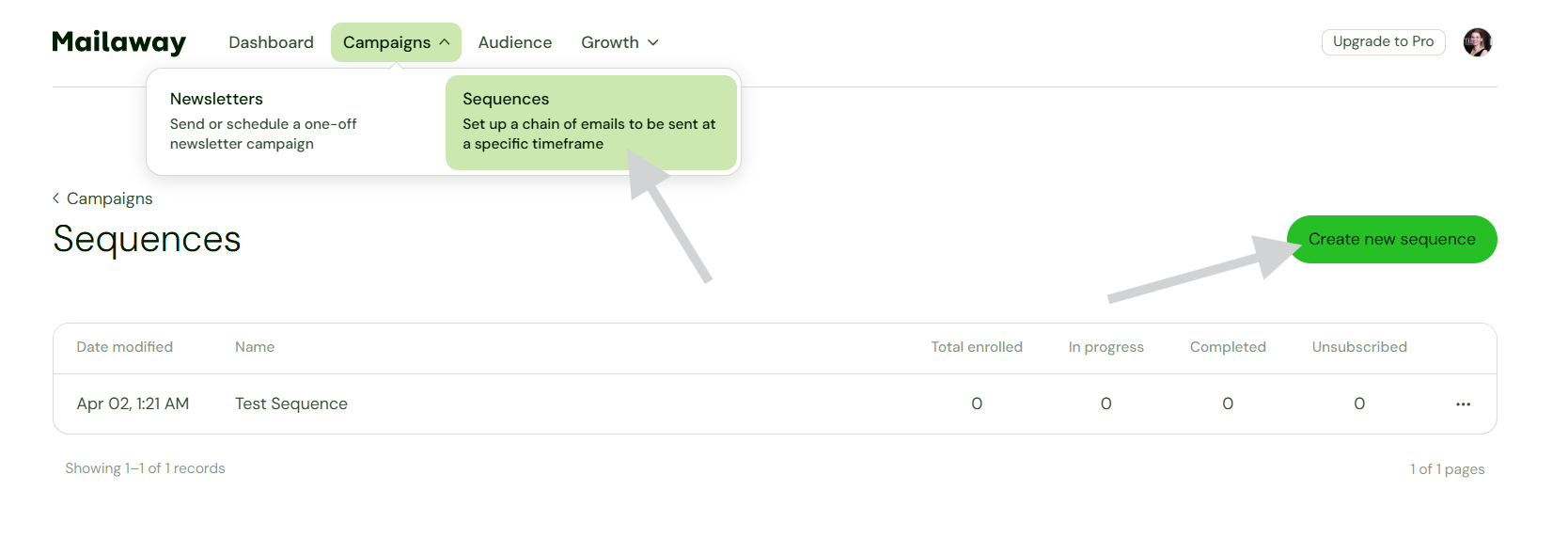
Then you'll fill in the details of the sequence
You'll:
- Add the number of emails needed
- Create a timeline for when emails will be delivered
- Fill in each email with content
- Name the Sequence
- Save!
Connecting Sequences to triggers
After you've created a Sequence, you can choose to trigger it with any Subscribe forms and pages.
You'll:
- Go to Growth
- Select Subscribe form or page
- Scroll down to the Subscribe actions
- Use the drop-down to choose a Sequence
- Save settings
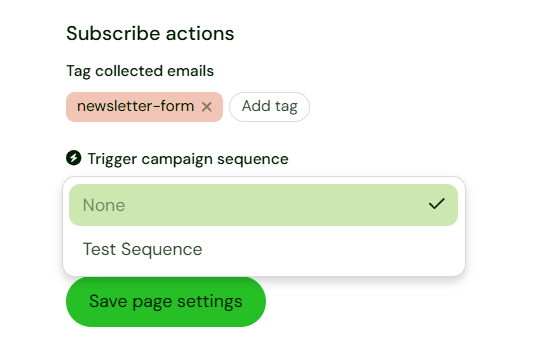
FAQ
Q: What happens if I edit a live Sequence and change the steps?
A: Subscribers that are already in an existing Sequence will complete the email series as it was before the edit. This may look like they skipped an email. But, it will maintain the timeline and ensure that no email is repeated.
Q: What happens if I run out of email credits while I have subscribers going through a Sequence?
A: We'll let you know when you're getting close to running out of email credits. So, you'll definitely have a heads up! If you do exceed the email credits in your subscription, we'll upgrade you to the next subscription tier, automatically. This will give you the credits needed, and will keep your Sequences running smoothly for all subscribers.